
 Tools DownPrivate testing
For traffic controllers and site crews in NSW
Knock off
on time.
Tools Down keeps track of the shift, the site and the dollars, so you always know when it's knock-off. Paste in the text with your next shift and it fills itself in for you to check. It tells you when to leave, opens directions to the site, and counts down to knock-off with what you've earned so far and roughly what you'll take home. No account, no sign-up: it all stays on your phone.
Planned: 14 days free from your first shift, then A$6.99 a month or A$59 a year. It isn't open yet, so there's nothing to pay. NSW only for now. Pay and tax figures are rough guides, not a payslip or tax advice.
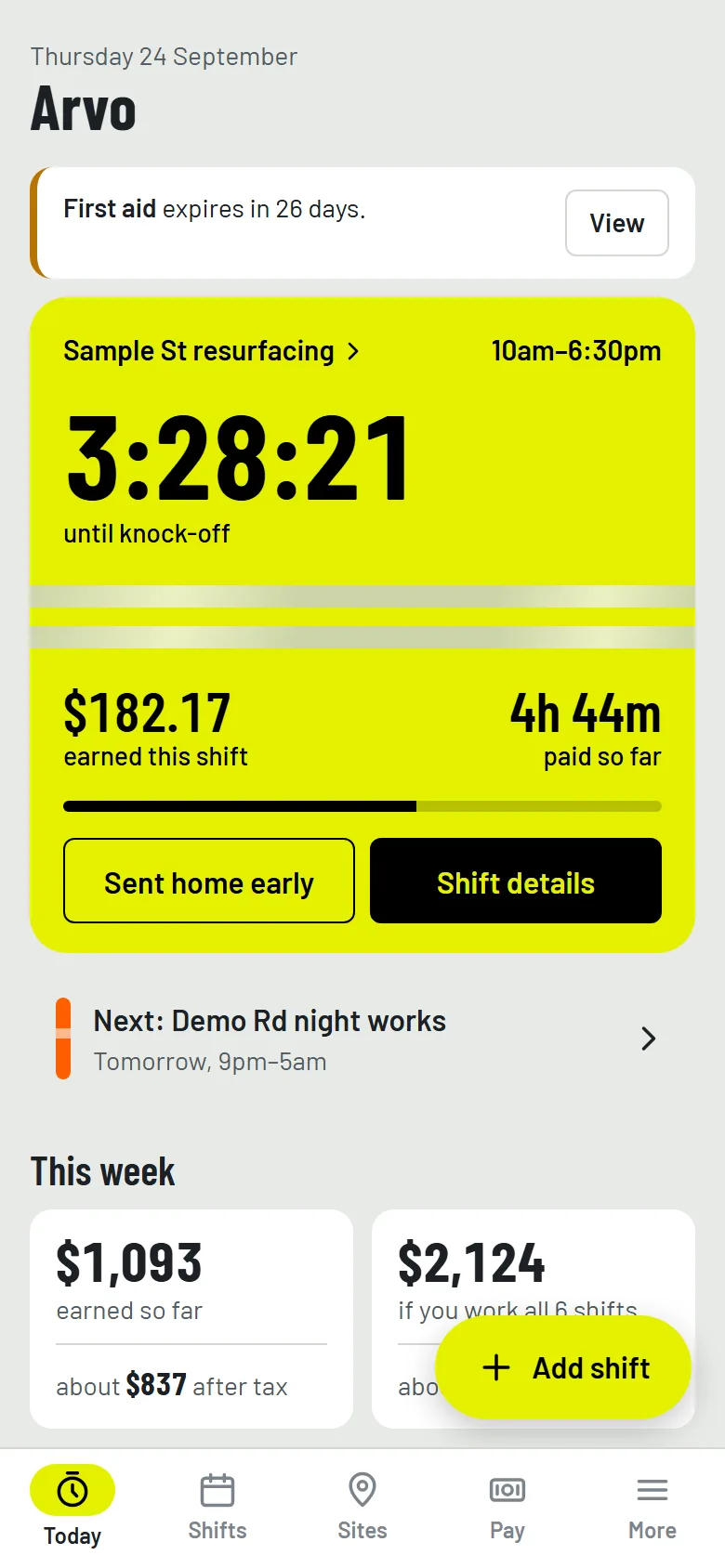
- When to leave for every shift, then a countdown to knock-off with what you've earned so far.
- Paste the text from your boss and the date, times and address fill themselves in for you to check.
- Every site in its own hi-vis colour, with directions by public transport or car.
- Your own overtime, weekend, night and public holiday rates, and a rough guide to what you'll take home after tax.
- Tickets and cards ready for site sign-in apps, with a photo of each to show on site and a warning before any run out.
- Made for your phone. Everything stays on it, and backs up to a single file.
Made for the phone in your pocket
Tools Down is a phone app and nothing else. It's built to be checked with one hand at the bus stop, in the ute or on smoko, in bright sun or in the dark.
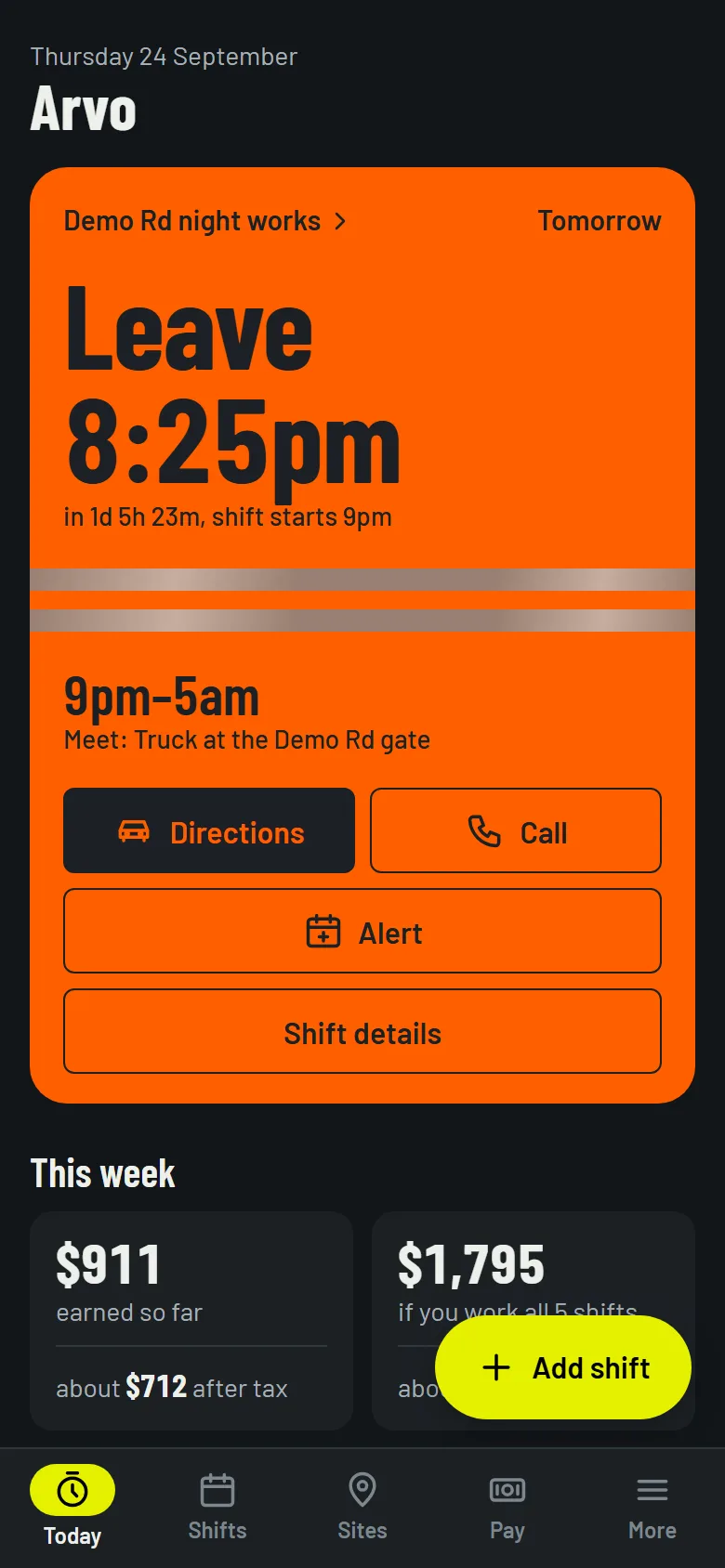
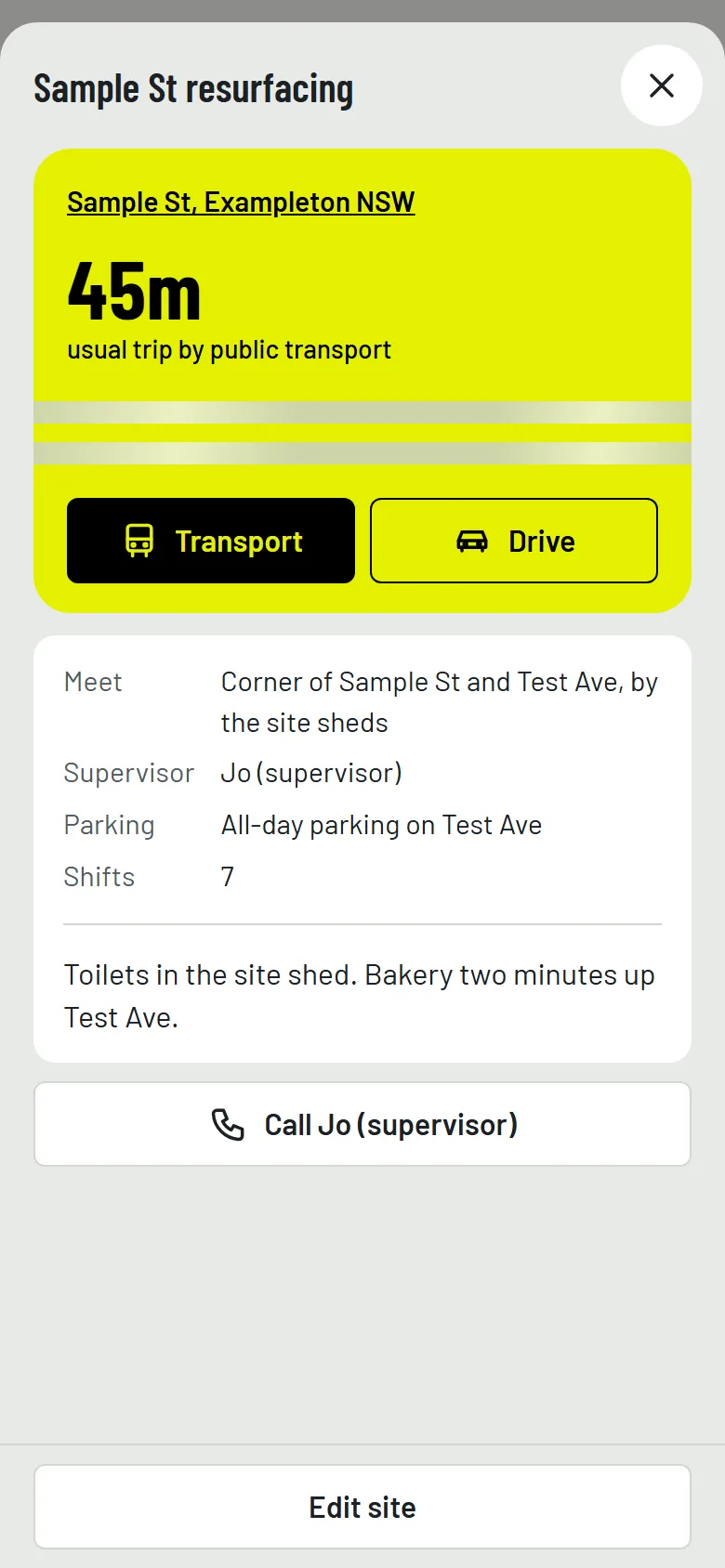
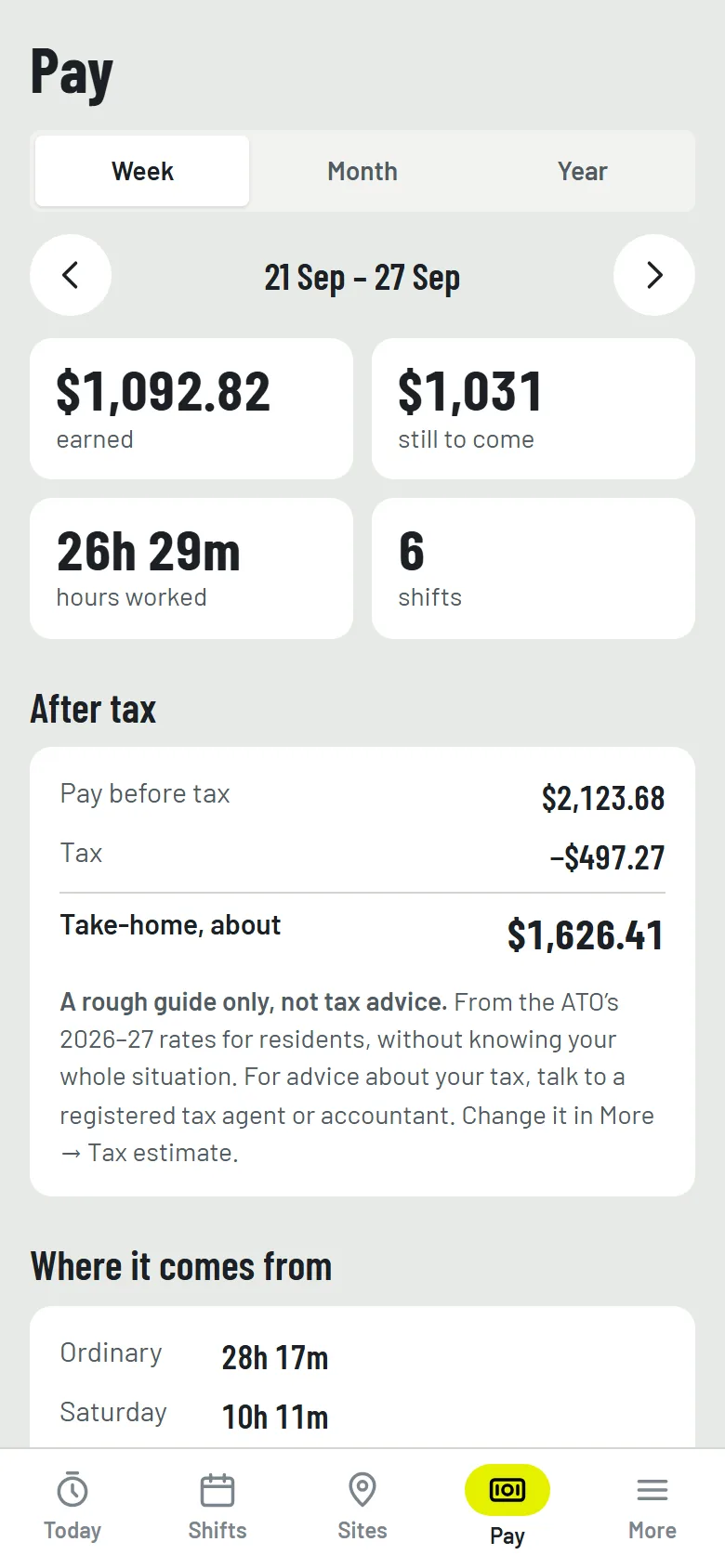
When to leave for a night shift, in the dark theme; everything about a site, with directions one tap away; and the week's pay, before and after tax. Tap any screen to see it full size.
A one-minute look around
A quick walk through Tools Down with made-up shifts and sites: pasting in a shift from the boss's text, tapping the timer for the site's details and directions, when to leave, the countdown to knock-off, a shift with no finish time yet, pay after tax, a weekly repeat, and your tickets, with a card's photo shown full screen.
A one-minute tour with captions and no sound, so you can watch it anywhere. Every site, street, name and number in it is made up.
What it does
The things you'd otherwise keep in your head, a pile of texts and the back of your hand.
-
Shifts
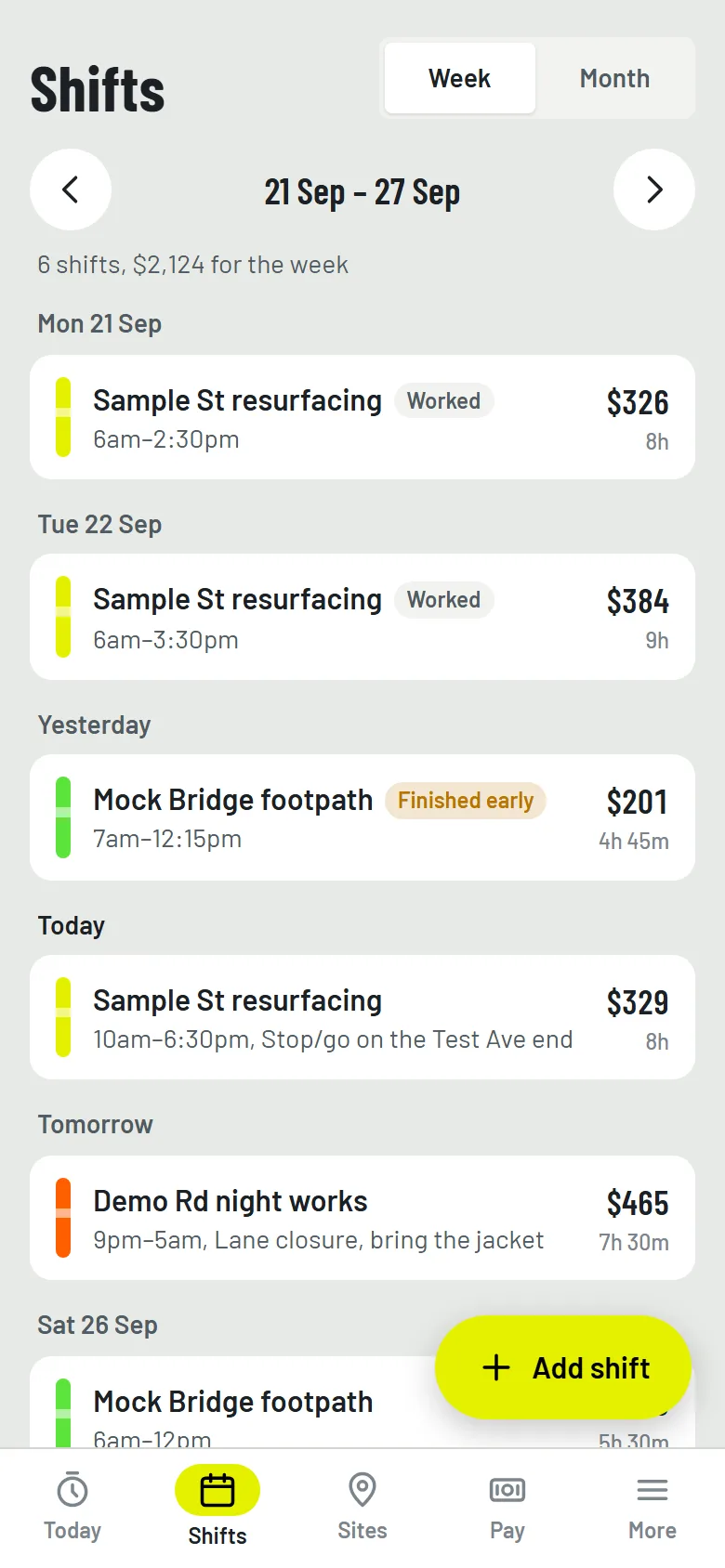
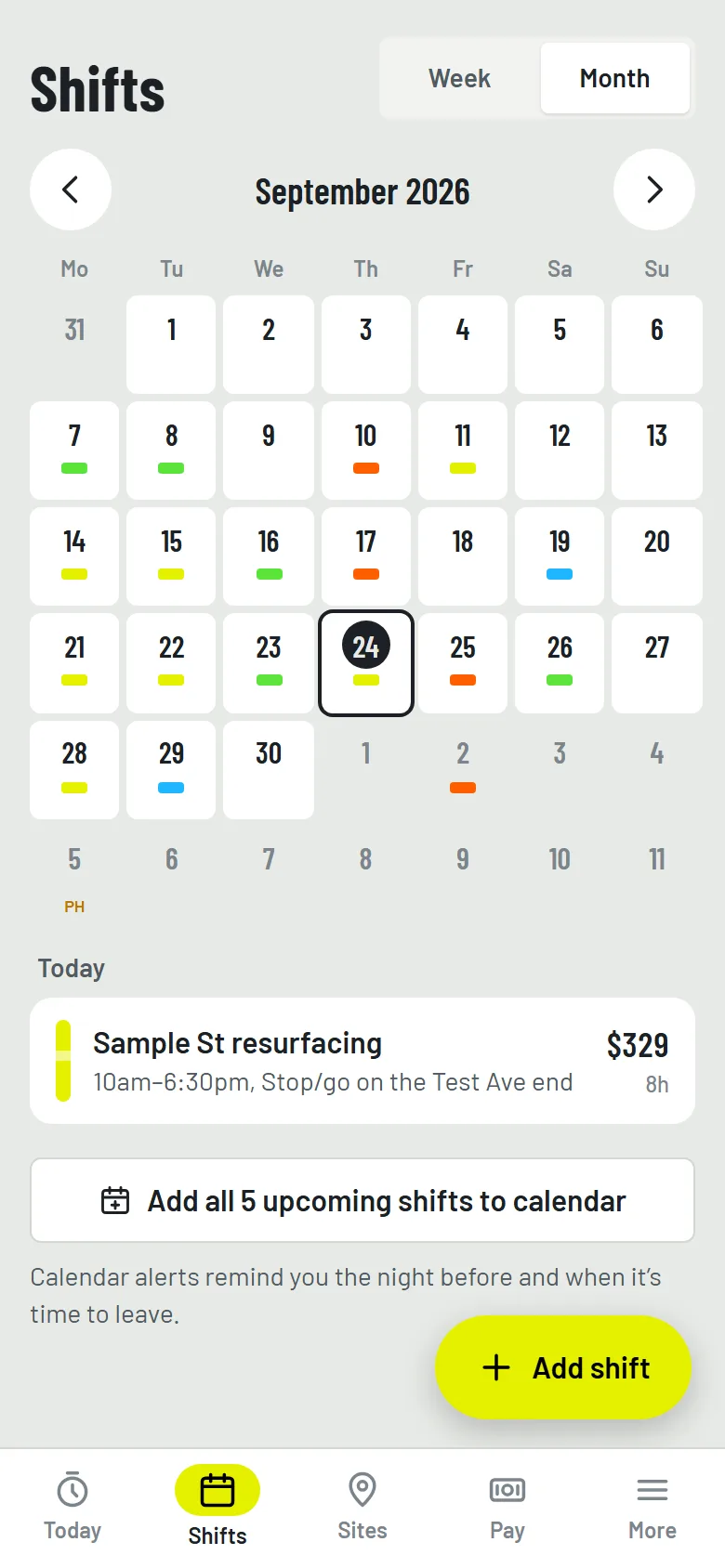
A week or month view, colour-coded by site, with NSW public holidays marked. Paste the text from your boss or roster app and it pulls out the date, times and address for you to check. Same hours every week? Set a shift to repeat and it keeps coming until you stop it.
-
Sites
Each site gets its own hi-vis colour, with the address, where to meet, the supervisor's number, parking and a photo of the gate. Transport and Drive open Google Maps or Apple Maps, and the boss is one tap away. On site, tap the timer on Today and it's all there.
-
Leave on time
It works out when to leave from your usual travel time plus a buffer, and puts your shifts in your phone's calendar with an alert the night before and another when it's time to go.
-
Countdown to knock-off
On shift, a big hi-vis card shows the time till knock-off, what you've earned so far and how much of the shift is done. Sent home early? One tap and the pay is worked out to that minute. Don't know when you'll finish? Leave it out, and it counts up the time on the clock until you knock off.
-
Pay, the way you're paid
Base rate, overtime, Saturday, Sunday, night and public holiday rates, minimum hours, cancellation pay and allowances, set to match your job. See the week, the month or the financial year, where each dollar came from, and roughly what you'll take home after tax. It's all a rough guide, not tax advice: check it against your payslip, and talk to a registered tax agent or accountant about your tax.
-
Tickets and cards
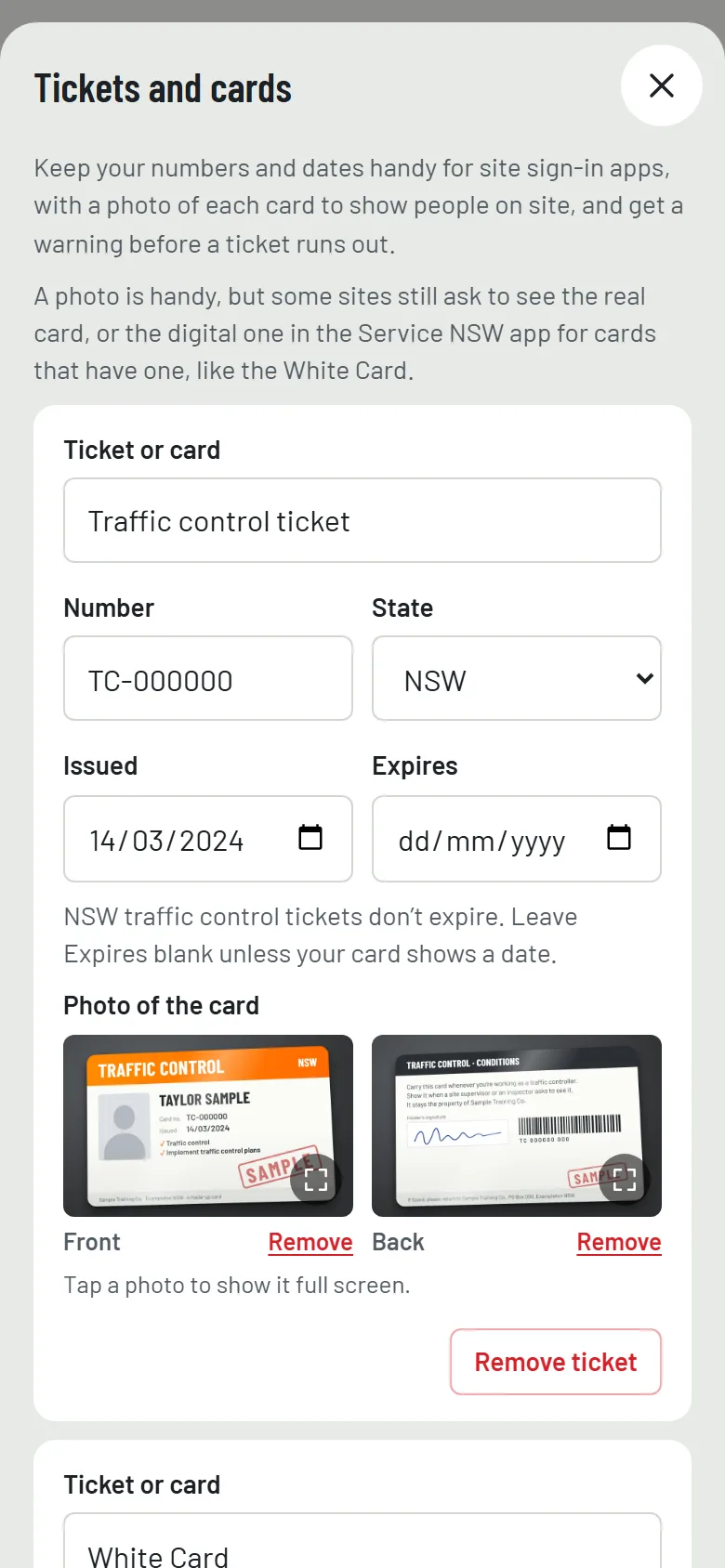
Your traffic control ticket, White Card, first aid, working at heights and more: the numbers, the state and the dates in one place, ready when a site sign-in app asks. Add a photo of each card, front and back, and show it full screen when someone on site wants to see it (some sites still ask for the real card). NSW traffic control tickets and White Cards don't expire; for the ones that do, there's a warning on Today and a reminder in your calendar.
A look inside
Real screens from Tools Down, filled in with made-up shifts, sites and people.
How it works
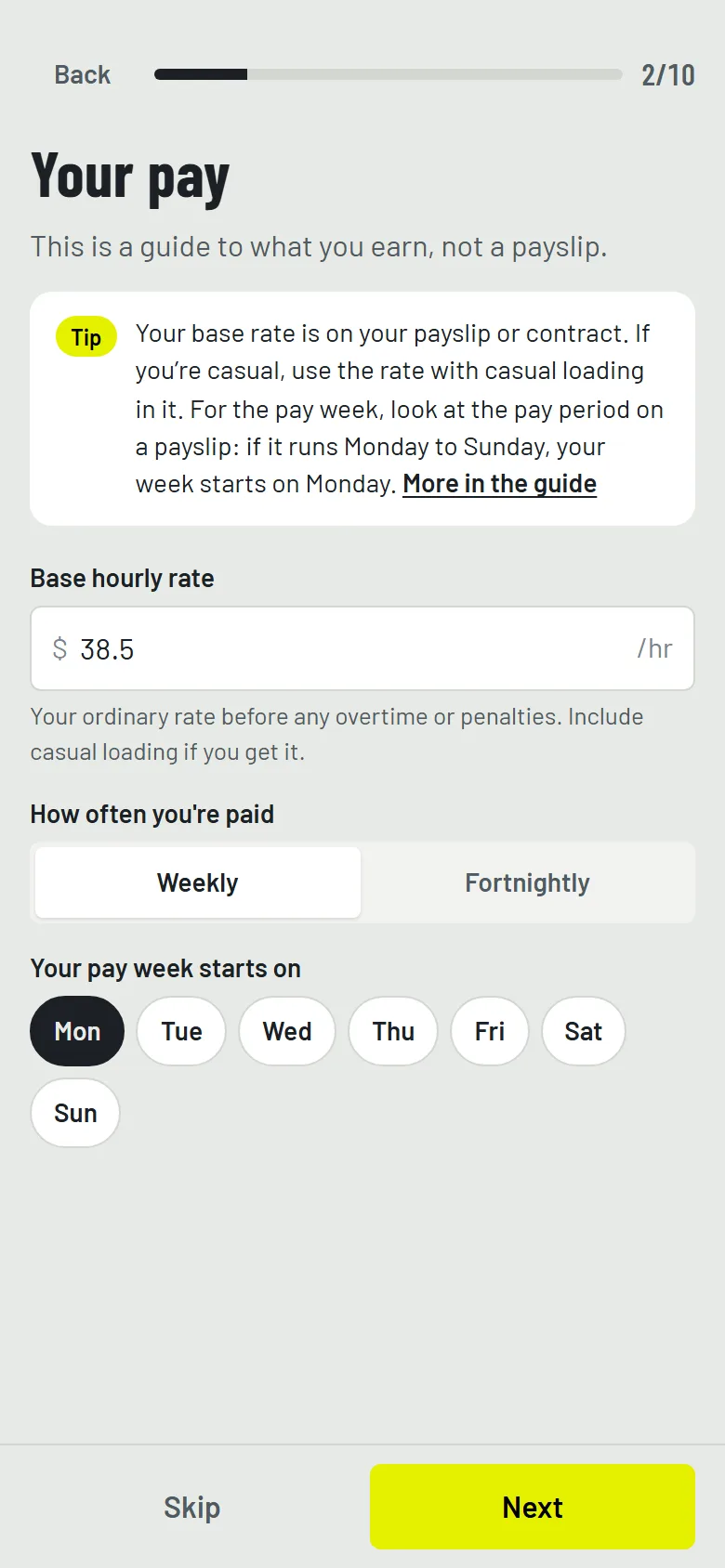
Tell it how you're paid
Base rate, pay week, tax, breaks, overtime, weekend and night rates, allowances and tickets. About three minutes, and you can skip anything and change it later.
Add your sites
The address, where to meet, who's in charge, parking, and how long it usually takes you to get there.
Add your shifts
Paste the text from your boss or tap in the times, then send them to your calendar for the alerts.
Go to work
Today tells you when to leave, then counts down to knock-off with the dollars ticking over.
Pricing
Here's the plan. Nothing's for sale yet, so there's nothing to pay.
Try it
Free for 14 days
The whole app: shifts, sites, leave-by times and directions, calendar alerts, the countdown, every pay rate and total, pay after tax, tickets and backups. The 14 days start with your first shift. No card and no sign-up.
Keep it
A$6.99 a month
Or A$59 a year, about A$25 less than paying monthly. It renews until you cancel, and you can cancel any time with no fee. The plan is that if you stop, nothing you've entered is deleted: you can still see it all and back it up.
That's the planned price, and I'll confirm it here before Tools Down opens.
Where your data lives
- Your shifts, sites, photos, pay and tickets are stored on your phone
- There is no account, no server, no sign-in and no analytics
- Directions open in your own maps app
- Reminders are events in your own calendar
- A backup is a single file you save yourself, to email, Drive or iCloud
- Once it's for sale, the only thing sent will be your licence key, to check it
What it isn't
- A payslip or payroll. Pay is a guide worked out from the rates you enter.
- Tax or financial advice. The after-tax figure is a rough guide from the ATO's general rates, so talk to a registered tax agent or accountant about your own tax.
- An award checker. Every company is different, so you set your own rates.
- Live traffic. Leave-by times use the travel time you save for each site, plus a buffer.
- For other states, yet. It's NSW only for now.
- Tied to any traffic control company or labour-hire agency
Put it on your phone
When it opens, Tools Down is a web app you add to your home screen like a normal app. No app store, and your shifts are there with no signal. On an iPhone, adding it to the home screen also makes Safari much less likely to clear your data.
iPhone
- Open Tools Down in Safari.
- Tap the Share button at the bottom.
- Choose Add to Home Screen, then Add.
Android
- Open Tools Down in Chrome.
- Tap the three-dot menu.
- Choose Add to Home screen or Install app.
New phone
- On the old phone, open More, then Backup and restore.
- Save a backup to your email or Drive.
- On the new phone, choose Restore from a backup.
Help sheets
Step-by-step sheets with a picture for every step, for iPhone, iPad and Android. Print them, or keep them on the phone.
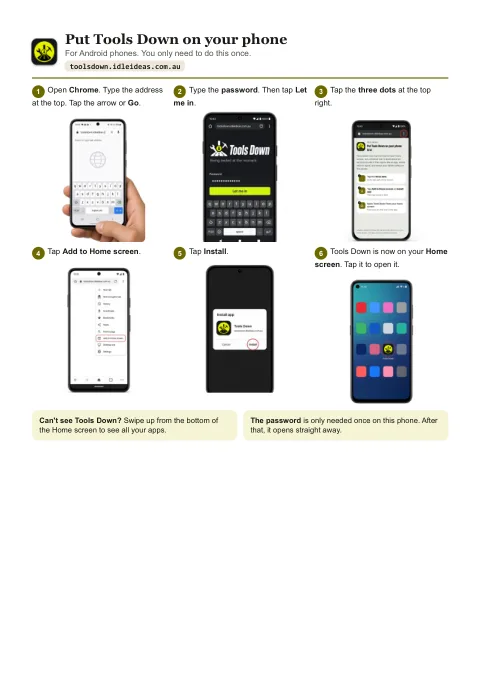
Put Tools Down on your phone
Six steps for Android, then six for iPhone and iPad, from opening the browser to Tools Down's icon on your Home screen.
Open the sheetPDF, two A4 pages, 581 KB.
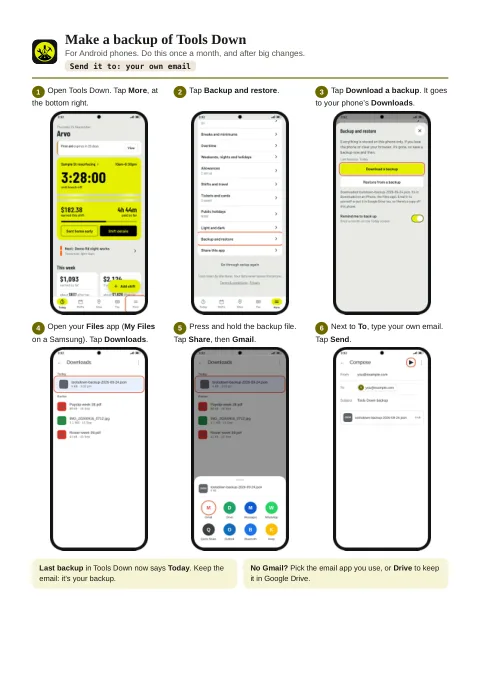
Backups: make one, load one
Make a backup and email it to yourself, then put it back on the same phone or a new one. Two pages for Android, then two for iPhone and iPad.
Open the sheetsPDF, four A4 pages, 901 KB.
Questions
Does it know my award rates?
No, and it doesn't pretend to. Companies and agreements all differ, so you enter your own base rate and your overtime, weekend, night and holiday rates. When more than one rate applies to the same minute, the highest one is used, not all of them stacked on top of each other. Always check it against your payslip, and if something looks wrong, ask your employer or the Fair Work Ombudsman.
How does it know when I should leave?
You save a usual travel time for each site once, by checking it in Google Maps or Apple Maps. Tools Down adds the buffer you choose and works back from your start time. It doesn't track where you are or check live traffic.
Will it remind me about my shifts?
Yes, through your phone's calendar. A web app can't send alerts by itself without a server, so your shifts go into your calendar with an alert the night before and another when it's time to leave, and your calendar does the reminding.
What if I'm sent home early, or the shift is cancelled?
Tap Sent home early and the pay is worked out to that minute, with your minimum hours if you get them. Called off late and still paid? Mark the shift cancelled and say how many hours were paid. Sent to another job instead? That's not a cancellation: keep it as worked at the new site, from the original start time.
What if I don't know when I'll finish?
Leave the finish time out. On shift, Today counts up the time on the clock and what you've earned, and Knock off now puts the finish time in when you're done. Forget, and it asks you later. Until then, the shift only counts what's certain, like your minimum hours.
Does it take tax out?
It shows roughly what you'll take home, worked out the way your employer's tax tables do it, from the ATO's rates for Australian residents. Tell it whether you claim the tax-free threshold and whether you're paying off HELP or another study loan. It's a rough guide only: your payslip might be a few dollars different, and your real tax is worked out at tax time.
Is the after-tax figure tax advice?
No. It's a rough guide from the ATO's general rates, and it doesn't know your whole situation, like other income, a second job, deductions or offsets, so don't rely on it for decisions about your tax. For advice about your own tax, talk to a registered tax agent or accountant.
Can I read it on night shift?
Yes. It's concrete grey by day and dark bitumen at night. Leave it on Automatic and it goes dark from 7pm to 6am, or have it follow your phone, or pick light or dark.
What happens if I lose my phone?
Your shifts live on your phone only, so losing it or clearing the browser loses them too, unless you've got a backup. Tools Down reminds you once a month. A backup is a single file, photos included, that you can email to yourself or keep in Drive or iCloud, and it restores on a new phone.
Is there a guide to get me started?
Yes. A step-by-step user guide is built into the app, under More: getting started, setting up your pay, sites, shifts, pasting a shift message, calendar reminders, pay, backups and more. Each step of setup has a tip that opens the right part of it.
Is it only for traffic controllers?
No. It started with a traffic controller in Sydney and it's built for site crews: traffic control, labourers, trades and labour hire, at sites that keep changing. But anyone paid by the hour can use it. The countdown to knock-off and the dollars adding up work just as well in a warehouse, a kitchen or a shop, and knowing what's coming in helps with the budget. On the same hours every week? Set a shift to repeat and it keeps going until you stop it.
Does it work outside NSW?
Not yet. For now the state is set to NSW and it knows NSW public holidays.
When can I get it, and what will it cost?
It isn't open yet. It's being tested on real shifts first. The plan is every feature free for 14 days from your first shift, then A$6.99 a month or A$59 a year. Register your interest and you'll get one email when it opens.
Tools Down is nearly ready.
It's being tested on real shifts in Sydney right now. This page will update when it opens, or register your interest and you'll get one email when it does.