

For electrical contractors and sole-trader sparkies
The run sheet built for how
sparkies actually work.
One-off callouts, installs and switchboard upgrades, booked and dispatched from your phone with none of the admin. Every client, job, checklist and invoice lives on your own device — no cloud account, no monthly platform bill, and nothing about your customers sent anywhere.
14 days free from when you add your business or first client, then AU$99 a year. Cancel any time. Works offline. Not a substitute for AS/NZS 3000 compliance.
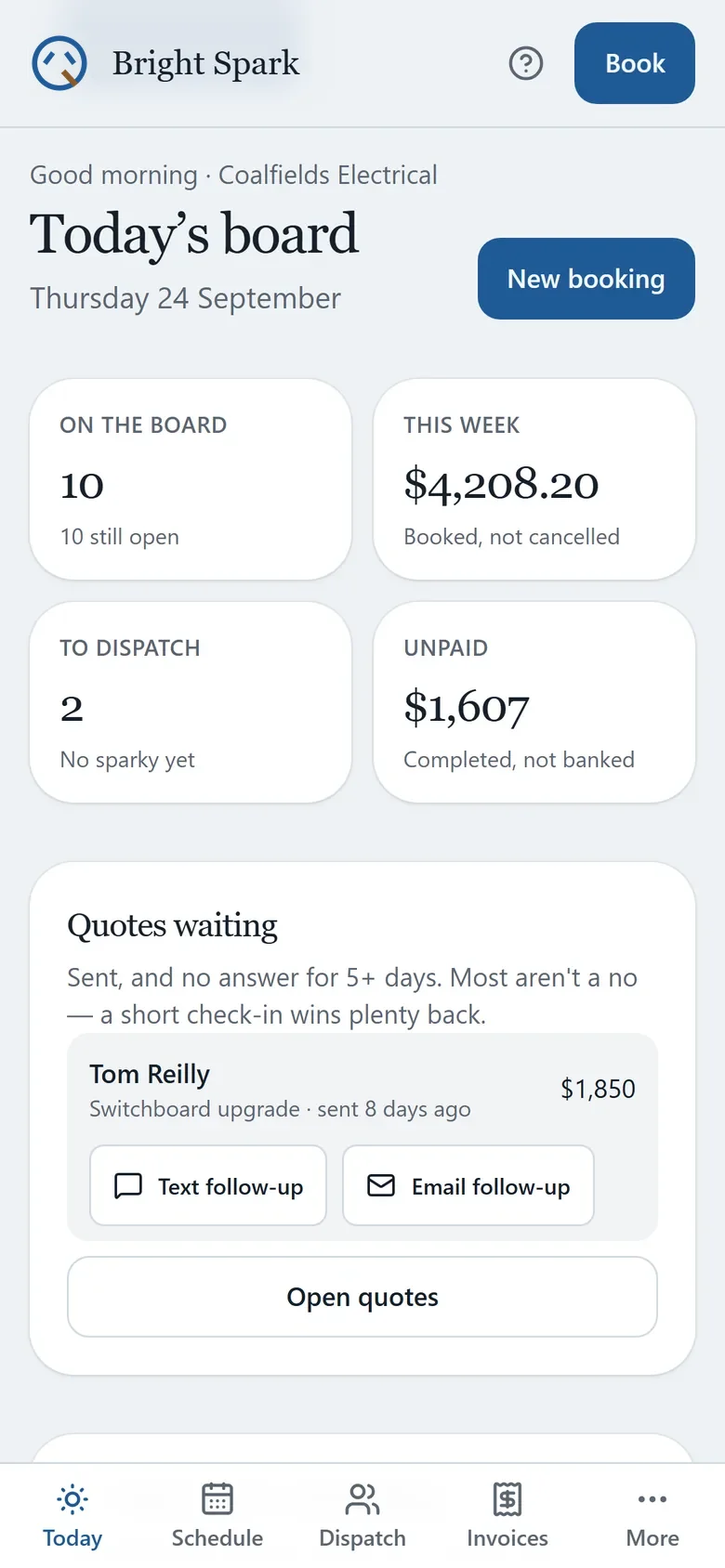
- Today's board: what's booked, who's on it, what's still open.
- Callouts, installs and compliance checks booked one at a time.
- A run sheet for each person to print, email, text or copy.
- Full-screen checklist mode for the person on the tools.
- Quotes and invoices with your own logo on them.
- A marketing kit to print: flyer, business cards and QR cards.
- Works on a phone, a tablet or a computer.
- Every byte stays on your device. Export a backup any time.
On the phone, the tablet or the laptop
Every screen fits whatever you've got: the phone in the van, a tablet on the bench, or the computer in the office.
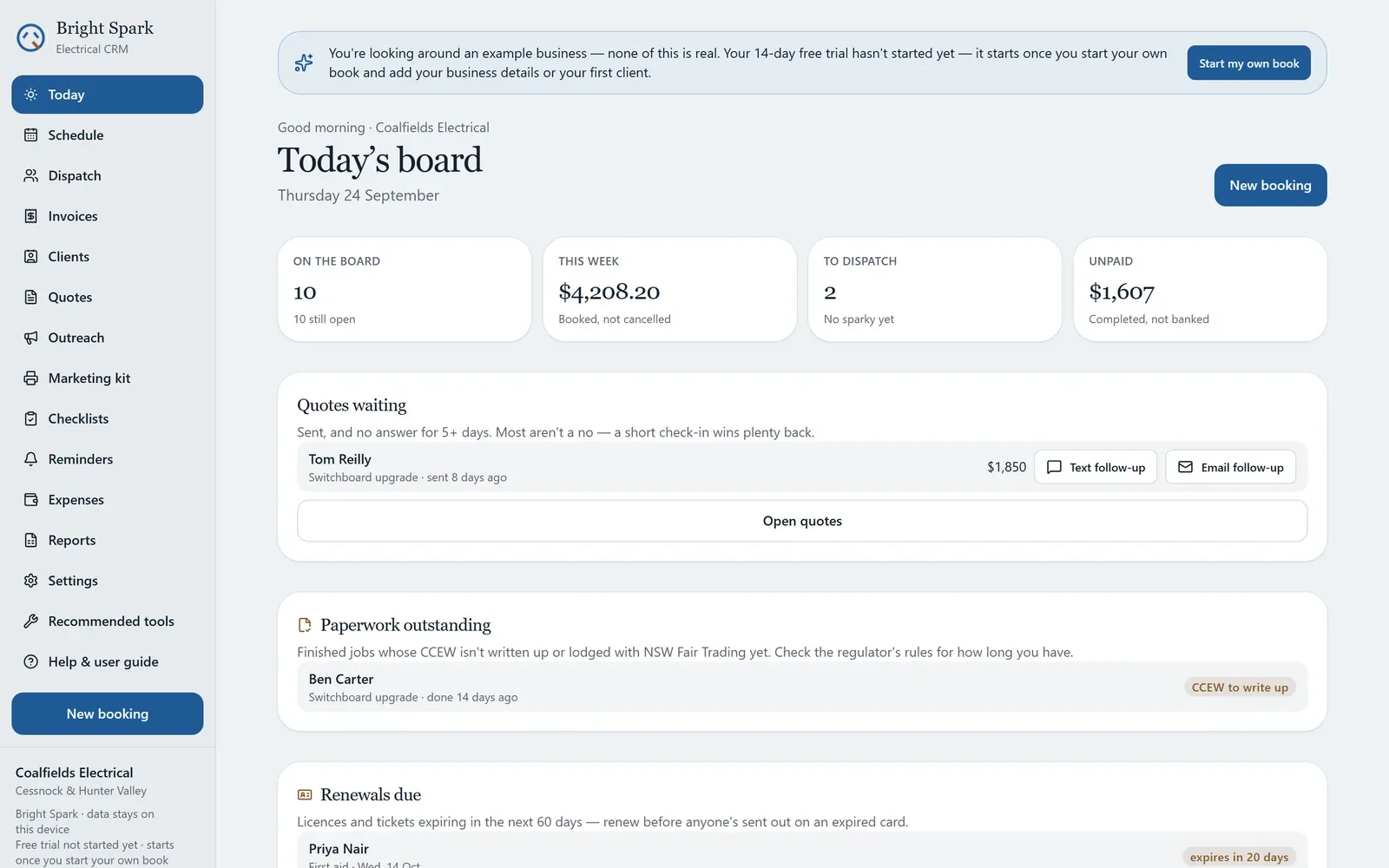
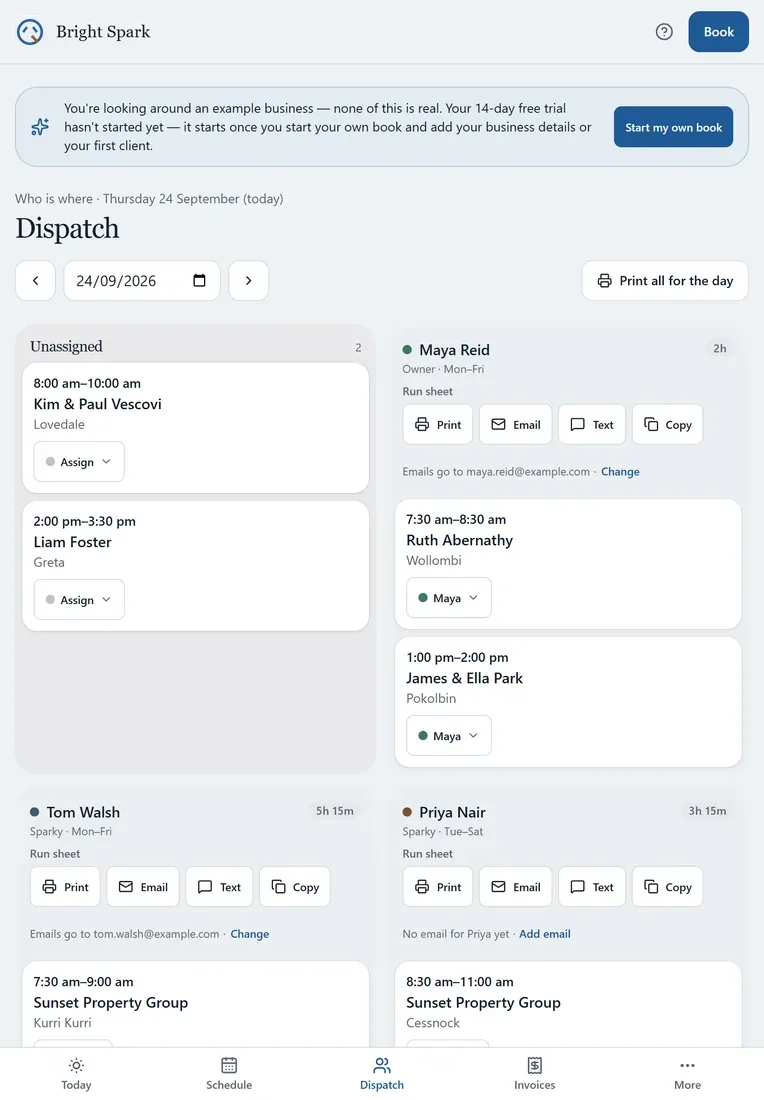
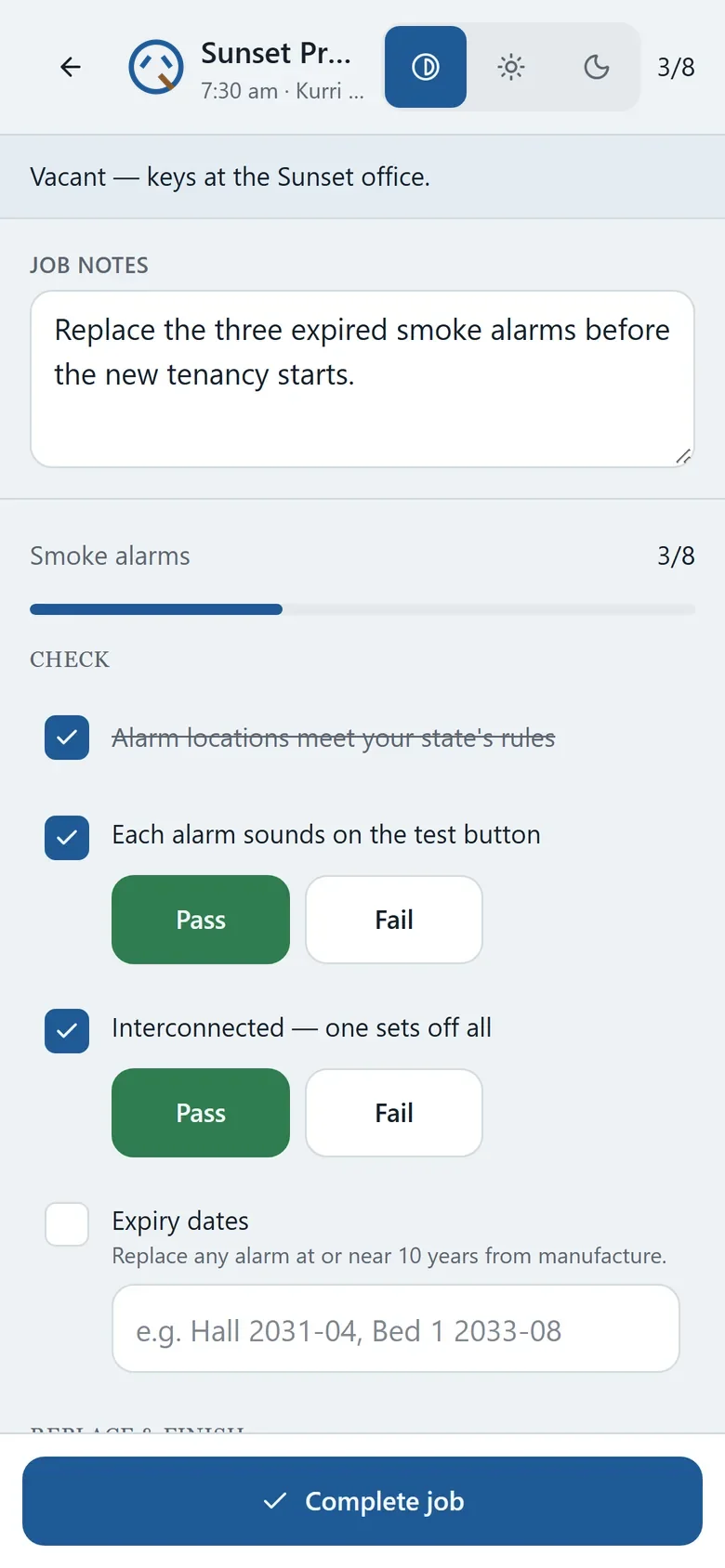
The same made-up example business on a laptop, a tablet and a phone: today's board, Dispatch, and a job on site. Tap any screen to see it full size.
A one-minute look around
I put together a short tour of the example business: today's board, Dispatch and a run sheet, a quote with a logo on it, a checklist on site, and the marketing kit.
A one-minute tour with captions and no sound, so you can watch it anywhere. The business, clients, addresses and numbers in it are all invented example details.
What it does
The parts of a sparky's week that usually live in a phone, a notebook and a pile of dockets.
-
One job at a time
Callouts, installs, switchboard upgrades and compliance checks, booked individually — not forced onto an auto-generating weekly round.
-
Run sheets for everyone
Assign the day's work on Dispatch, then print, email, text or copy each person's run sheet — yours too. It carries every job detail: address and map link, client phone, access notes, job notes, materials and the checklist.
-
Checklists that fit the job
Isolate, test, certify. Real steps for a callout or a switchboard upgrade, with pass and fail marks, full-screen on the phone, not a generic to-do list.
-
Your logo on the paperwork
Upload your logo once and it goes on quotes, invoices, job reports, run sheets, reports and the marketing kit. GST-inclusive invoices come straight from the finished job, and you can see who still owes what.
-
Compliance nudges
Test-and-tag and RCD retests come up before they lapse. It's a nudge, not a booking — nothing books itself behind your back.
-
No-show reminder drafts
Drafts a polite reminder for upcoming first visits and clients who've missed before, in your own words — you read it and send it, so nothing goes out on its own.
-
A marketing kit to print
A letterbox flyer, business cards, QR cards and next-check-due cards, all with your logo and details. The QR code can save your number straight into someone's phone, ring you, or open your review link or website.
-
Phone, tablet or desktop
Every screen fits a phone, a tablet either way up, a laptop and a desktop, with bigger buttons on a touch screen.
-
A guide built in
A step-by-step user guide lives inside the app, in plain English and in the order you'll need it. You can print it too.
A look inside
Real screens from Bright Spark, showing its made-up example business, Coalfields Electrical.
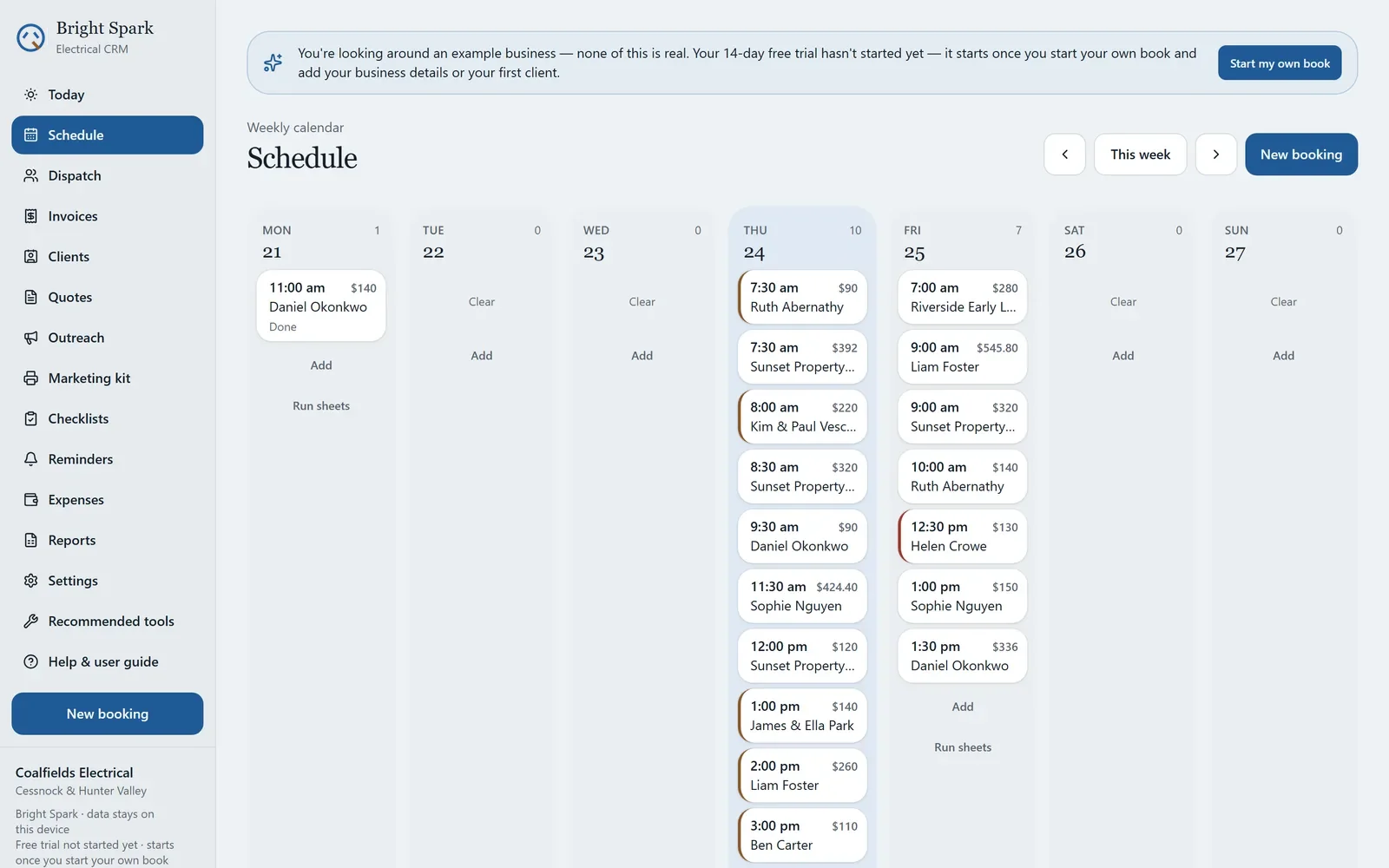
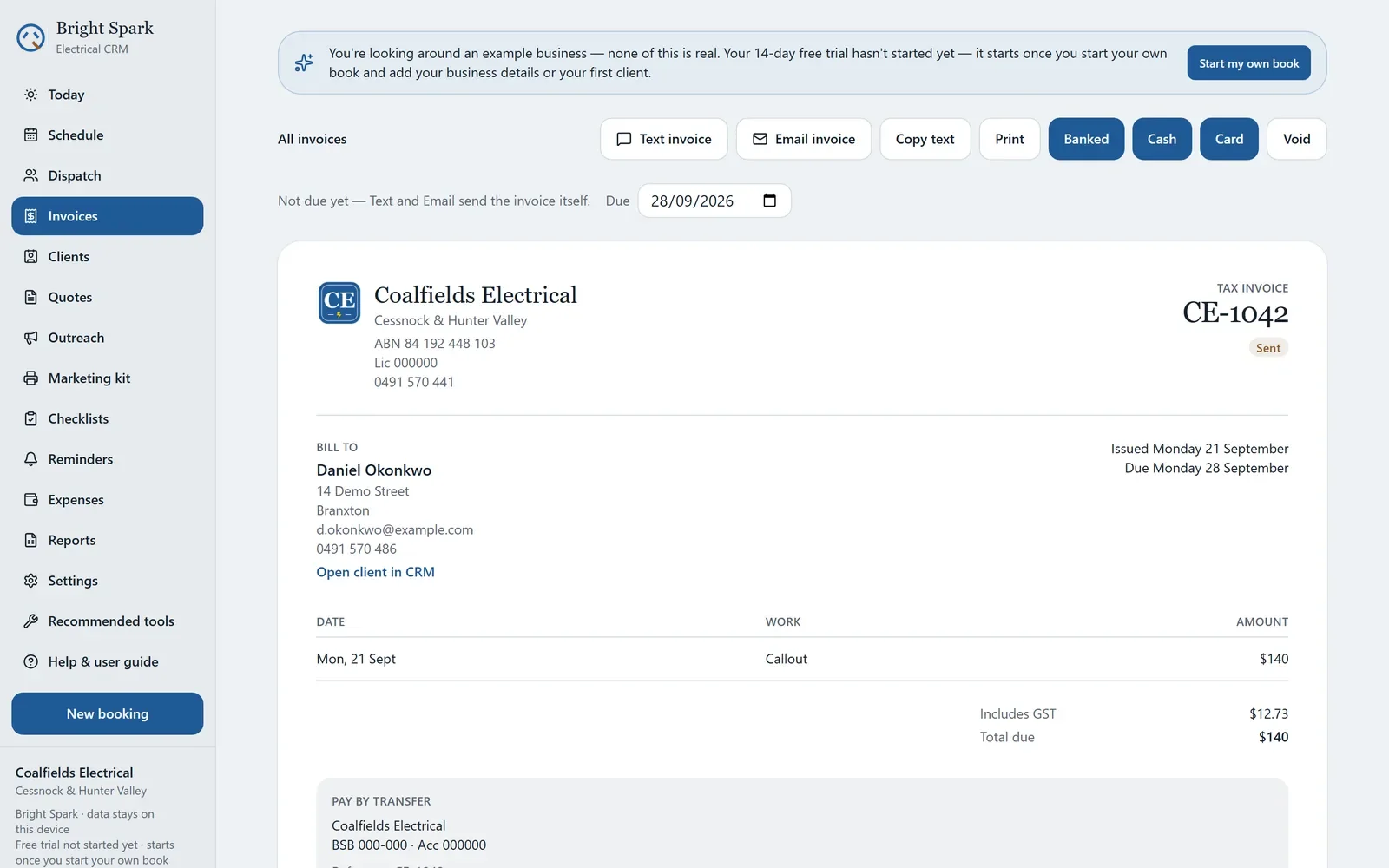
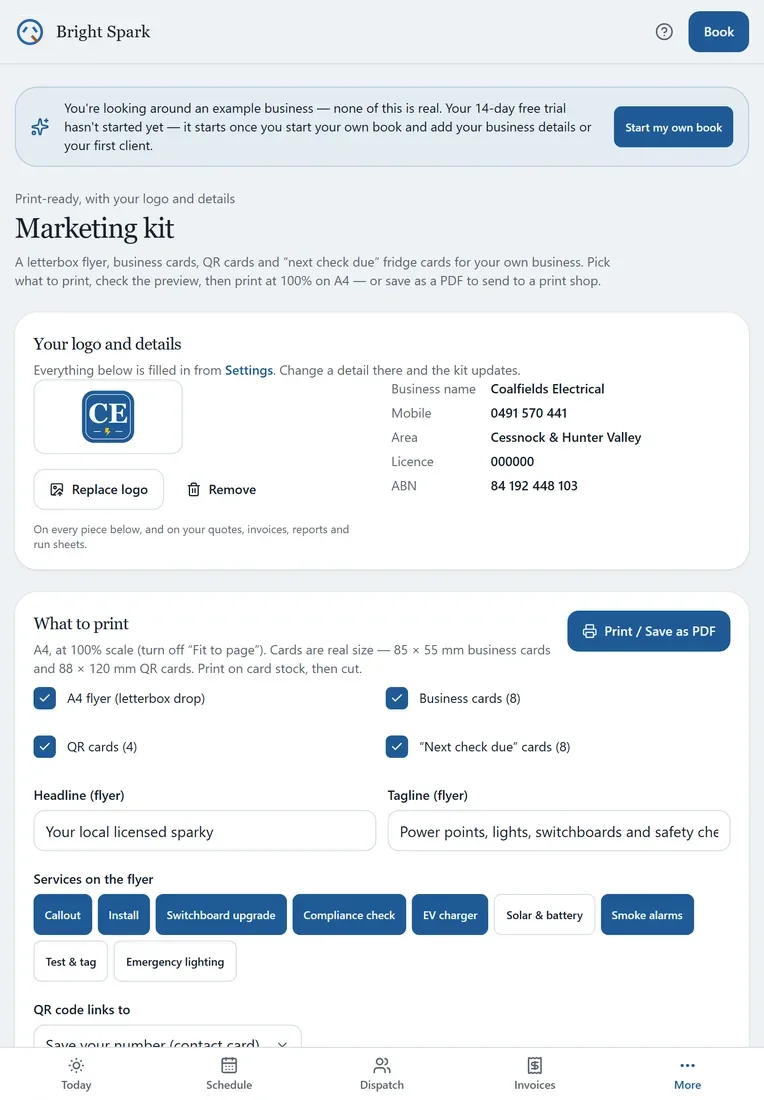
How it works
Set up the business
Business name, ABN, licence and your logo, then the team, with each person's mobile and email so run sheets reach them. Saving your details starts the free trial.
Add clients, book the work
Site address, access notes and anything the sparky needs before they knock. Then a callout, an install or a switchboard upgrade, one job at a time.
Send out the day
On Dispatch, print, email, text or copy each person their run sheet. On site, open the checklist, isolate, test, tick it off, mark the job done.
Invoice and back up
Invoice the finished jobs with your logo on them. Export a backup now and then; it's the only copy that exists.
Pricing
One plan, billed once a year. No per-user fee, no surprise tiers.
Trial
Every feature 14 days
Every feature, no card, no sign-up. The 14 days start when you save your business details or add your first client — not when you open the app, and looking around the example business doesn't use them up.
Subscription
AU$99 per year
The whole price — no GST on top. Renews automatically once a year, with a reminder email about seven days before. Cancel any time in the billing portal or from your receipt email, with no fee. Without a subscription Bright Spark goes read-only: nothing is deleted, and everything stays on your device to view, print and back up.
Where your data lives
- Every client, job, invoice and checklist is stored in your browser on your device
- Photos of the board or the fault, and your logo, stay on the device too, never uploaded
- Run sheets, messages, QR codes and PDFs are made on the device and sent from your own phone or email
- There is no account, no database and no sign-in
- Even the fonts are self-hosted, so the only third-party call the app ever makes is checking your licence key once you've bought one
- Export makes a full backup file you keep wherever you like
What it isn't
- A cloud service. Nothing syncs between devices; move data with Export and Import.
- A compliance authority — it doesn't certify work or replace AS/NZS 3000
- Payroll, accounting or tax software
- Something that quietly charges you every month
Put it on your phone
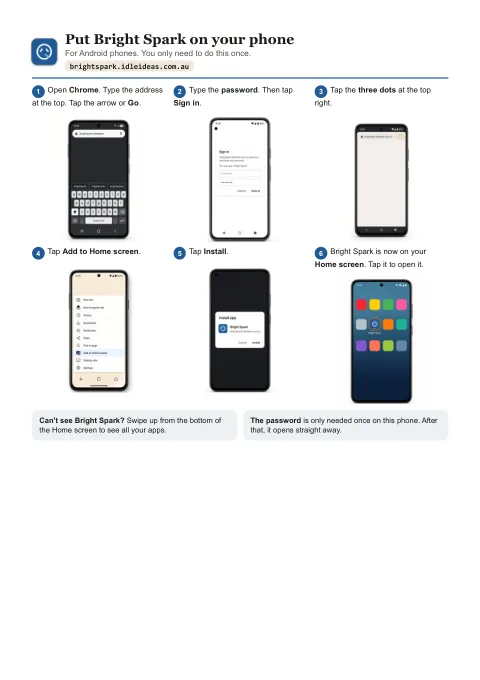
Bright Spark is a web app that installs like a normal app. No app store needed, and it works with no signal — basements, new builds, the lot.
iPhone or iPad
- Open Bright Spark in Safari.
- Tap the Share button at the bottom.
- Choose Add to Home Screen, then Add.
Android
- Open Bright Spark in Chrome.
- Tap the three-dot menu.
- Choose Add to Home screen or Install app.
Laptop or desktop
- Open Bright Spark in Chrome or Edge.
- Click the install icon at the right of the address bar.
- It opens in its own window from then on.
Help sheets
Step-by-step sheets with a picture for every step, for iPhone, iPad and Android. Print them, or keep them on the phone.
Put Bright Spark on your phone
Six steps for Android, then six for iPhone and iPad, from opening the browser to Bright Spark's icon on your Home screen.
Open the sheetPDF, two A4 pages, 475 KB.
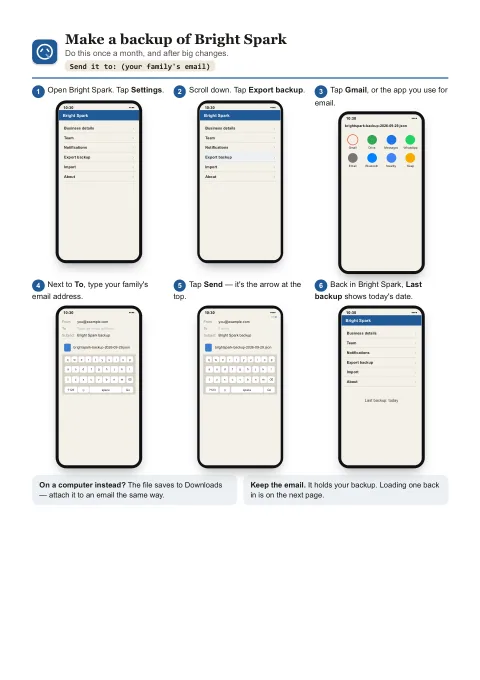
Backups: make one, load one
Page one emails a backup to yourself or family. Page two puts it back, on the same phone or a new one.
Open the sheetsPDF, two A4 pages, 353 KB.
Questions
When does my free trial start?
When you save your business details or add your first client (or any job, quote, invoice or expense of your own). Opening the app, looking around and trying things on the example business don't count, and the app tells you when the 14 days have started.
Can I email my team their run sheet?
Yes. On Dispatch, everyone who has work that day — you included — gets Print, Email, Text and Copy buttons. The run sheet has every job in time order with the address, client phone, access notes, job notes, materials and checklist. Add or change someone's email right there on Dispatch, or on the Team page in Settings. The email goes from your own email app, not from Bright Spark.
Can I put my logo on invoices?
Yes. Upload it once in Settings and it goes on your quotes, invoices, job reports, test and tag registers, run sheets, the reports printout and the marketing kit. Without one, they show your business name on its own.
Does it work on my tablet?
Yes. Every screen is made to fit a phone, a tablet either way up, a laptop and a desktop, and the buttons get bigger on a touch screen. Your data stays on whichever device you use, so pick one to be the main one and move data with Export and Import when you need to.
Does it work in a basement with no signal?
Yes. Once it's installed it runs fully offline — the whole app and all your data are already on the device. You only need a connection to open it the very first time and to activate your licence; after that it re-checks the licence now and then when it's online, and being offline never locks you out.
Why is everything blue, brown and green?
They're the AS/NZS 3000 conductor colours, remapped to the interface: Neutral blue is the main colour, Active brown marks warnings, and Earth green is used only for "compliant" and "done". It's a small thing, but it means the colours already mean something to a sparky.
What happens after the 14-day trial?
Bright Spark becomes read-only until you subscribe. Nothing is deleted: every client, job, quote, invoice, test record and photo stays on your device to view and print, you can still send quotes, invoices and run sheets you've already written and record payments on them, and Export still makes a full backup.
Can my apprentice see the same jobs?
Not live. Bright Spark has no server, so each device holds its own copy. Most small outfits run it on one phone or tablet and send each person their run sheet from Dispatch. Export and Import move everything between devices when you need to.
Is there a guide to get me started?
Yes. The user guide is built into the app: getting started, run sheets, checklists, quotes, invoices, the marketing kit, backups and the trial, step by step. You can print it if you'd rather read it on paper.
What happens if I lose my phone?
Your data was only on that phone, so you'd restore from your last Export file. Make one whenever you've done a lot of work — it's a single file you can keep in email, Drive or iCloud.
Does it certify my work?
No. The checklists are a prompt so nothing gets skipped, not a certificate. Compliance, testing and any paperwork required under AS/NZS 3000 remain entirely your responsibility.
Bright Spark is looking for testers.
It's in its last round of testing before it opens. If you're a sparky and want to try it on your own jobs, email brightspark@idleideas.com.au and say whether you work on your own or with a team.